
Description
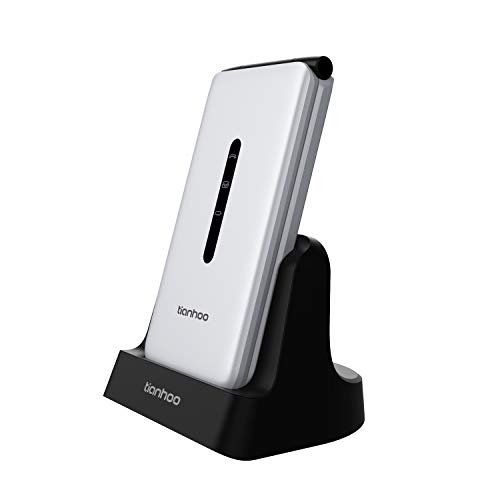
TIANHOO Flip Phone for Seniors 4G, Senior – Features & Prices in Saudi Arabia :
TIANHOO Flip Phone for Seniors 4G, Senior Flip Phone Unlocked with Big Buttons Dual Card GSM LTE Flip Phone for Elderly with Large Buttons Flip Cell Phone for Seniors (Silver)
Package Dimensions
5.31 x 3.66 x 3.58 inches
Item Weight
12.4 ounces
ASIN
B08QYSD3HW
Batteries
1 Lithium Ion batteries required. (included)
RAM
512 MB
Wireless communication technologies
Bluetooth, Cellular
Connectivity technologies
Bluetooth
Other display features
Wireless
Device interface – primary
Microphone, Buttons
Other camera features
Rear
Form Factor
flip
Colour
Silver
Battery Power Rating
2000
Included Components
Adapter, USB Cable
Manufacturer
TIANHOO
Country of Origin
China
Date First Available
December 18, 2020
Test video – TIANHOO Flip Phone for Seniors 4G, Senior :
Product highlights :
Questions & Answers – TIANHOO Flip Phone for Seniors 4G, Senior :
Technical specifications – TIANHOO Flip Phone for Seniors 4G, Senior :
Purchase advice :
-
Warranty :
Check the duration of the warranty and also the faults and defects it covers. Is it complete or limited? and What is included in the warranty (parts, repairs or both)?
-
Shipping :
Is delivery offered? And how long does it take to get delivered (Delivery time)
-
Proof of purchase :
Does the shop give you an invoice ?
-
After-sales service :
Do they have an after-sales service to have information about the installation or operation (instructions for use). Also in case of problem, it is the seller who takes charge or you must contact the manufacturer or supplier yourself.
_____________________________
D. N (verified owner) –
DIFFICULT AND CHALLENGING FOR A SENIOR – Seniors vary greatly in terms of basic technology knowledge. When purchasing any senior phone, the goal is simplicity, large buttons and easy charging. It also has to be at least 4G.
S. B (verified owner) –
Battery life is not that good as claimed – I bought this phone few weeks ago, in general it is a good phone. However, the battery consumption is very high, it drops to 56% after 8 hours stand by. I am an old person and do not have experience on smartphones; therefore, I heavily rely on manual and support line to learn how to operate this phone; but the manual is poor, there is no support channel except asking questions in Amazon. If you are an experienced user or you only want to make calls and text, then this phone is a good choice.
S. I (verified owner) –
I feel like I’m 16 again. I love it!!! – This phone is amazing. When I tell you it brings simplicity back into my life… It brings me so much easier times and less social media and zero stress…. Get it! You won’t regret it! ♥️
D. N (verified owner) –
DIFFICULT AND CHALLENGING FOR A SENIOR – Seniors vary greatly in terms of basic technology knowledge. When purchasing any senior phone, the goal is simplicity, large buttons and easy charging. It also has to be at least 4G.
P. K (verified owner) –
Bought it for my grandpa – I bought it for my grandpa and he really likes it because it has big numbers and it has the stand up charging station.
P. F (verified owner) –
It works but not a good phone for people who don’t understand smartphones – Decent phone with WhatsApp installed.
R. B (verified owner) –
Less than a year and not working – Bought this phone for my 83 year old mother in law as her flip phione needed an upgrade due to diconnecting 3G. Worked for less than a year. Tried swapping with a new SIM card as she had hers for a while. Even put my current working SIM card in her phone and still would not connect with the net work. Unfortunately my elderly mother in law cannot adapt to a smart phone and needs a flip phone. This worked only for a short time
G. L (verified owner) –
Not Loud Enough for Voicemail Prompts – I really, really wanted to like this phone. It was difficult to setup because of the keyboard, or lack of one. So I hooked up a bluetooth keyboard, but that only worked so well because with the bluetooth keyboard, I could not formulate the at symbol (@), needed to enter my email address. Instead, I kept getting the letter M whenever I typed SHIFT + 2, needed for the @ symbol. I also did not figure out how to enter a capital letter without using the bluetooth keyboard. This sort of thing made the setup process take an hour or longer. The final blow was when I called to check my voicemail messages. I could hardly hear them! I checked the volume level which was 13 out of 15. I raised it to 15, but still the voice mail prompts were rather low in volume, which was fine if there was no other sound in the room, but would never work outside, let alone in a noisy public area.
P. F (verified owner) –
It works but not a good phone for people who don’t understand smartphones – Decent phone with WhatsApp installed.
S. B (verified owner) –
Battery life is not that good as claimed – I bought this phone few weeks ago, in general it is a good phone. However, the battery consumption is very high, it drops to 56% after 8 hours stand by. I am an old person and do not have experience on smartphones; therefore, I heavily rely on manual and support line to learn how to operate this phone; but the manual is poor, there is no support channel except asking questions in Amazon. If you are an experienced user or you only want to make calls and text, then this phone is a good choice.
S. I (verified owner) –
I feel like I’m 16 again. I love it!!! – This phone is amazing. When I tell you it brings simplicity back into my life… It brings me so much easier times and less social media and zero stress…. Get it! You won’t regret it! ♥️
E. N (verified owner) –
No funciona con WhatsApp – No me funciona con el WhatsApp cómo debería con otros teléfonos
E. N (verified owner) –
No funciona con WhatsApp – No me funciona con el WhatsApp cómo debería con otros teléfonos
R. B (verified owner) –
Less than a year and not working – Bought this phone for my 83 year old mother in law as her flip phione needed an upgrade due to diconnecting 3G. Worked for less than a year. Tried swapping with a new SIM card as she had hers for a while. Even put my current working SIM card in her phone and still would not connect with the net work. Unfortunately my elderly mother in law cannot adapt to a smart phone and needs a flip phone. This worked only for a short time
G. L (verified owner) –
Not Loud Enough for Voicemail Prompts – I really, really wanted to like this phone. It was difficult to setup because of the keyboard, or lack of one. So I hooked up a bluetooth keyboard, but that only worked so well because with the bluetooth keyboard, I could not formulate the at symbol (@), needed to enter my email address. Instead, I kept getting the letter M whenever I typed SHIFT + 2, needed for the @ symbol. I also did not figure out how to enter a capital letter without using the bluetooth keyboard. This sort of thing made the setup process take an hour or longer. The final blow was when I called to check my voicemail messages. I could hardly hear them! I checked the volume level which was 13 out of 15. I raised it to 15, but still the voice mail prompts were rather low in volume, which was fine if there was no other sound in the room, but would never work outside, let alone in a noisy public area.
P. K (verified owner) –
Bought it for my grandpa – I bought it for my grandpa and he really likes it because it has big numbers and it has the stand up charging station.